LAB 15 · 语言指代小练习:目标、参照与关系
按问题继续
RGB规则提框、错误关键词基线、目标/参照/关系与干预
对应课堂(2 页)
可先阅读已有结果,再决定是否运行。重算时请核对各节记录的数据、参数、环境与日期。
学习路径: 一句话指向哪个对象
依次读关键词失败、RGB候选框、目标/参照/关系和四个干预输出。颜色阈值与有限词表是明确规则,没有训练GLIP或GroundingDINO;规则练习的价值是每一步都能对应到像素、坐标和输出。
完成时给出原图、遮挡、颜色交换和换关系四种情况下的目标及原因,并解释何时应返回无唯一目标。代码按原顺序可独立运行,2026-09-22历史结果在干预证据页。学习式开放定位仅在末尾保留一手入口,不当成已完成实验。
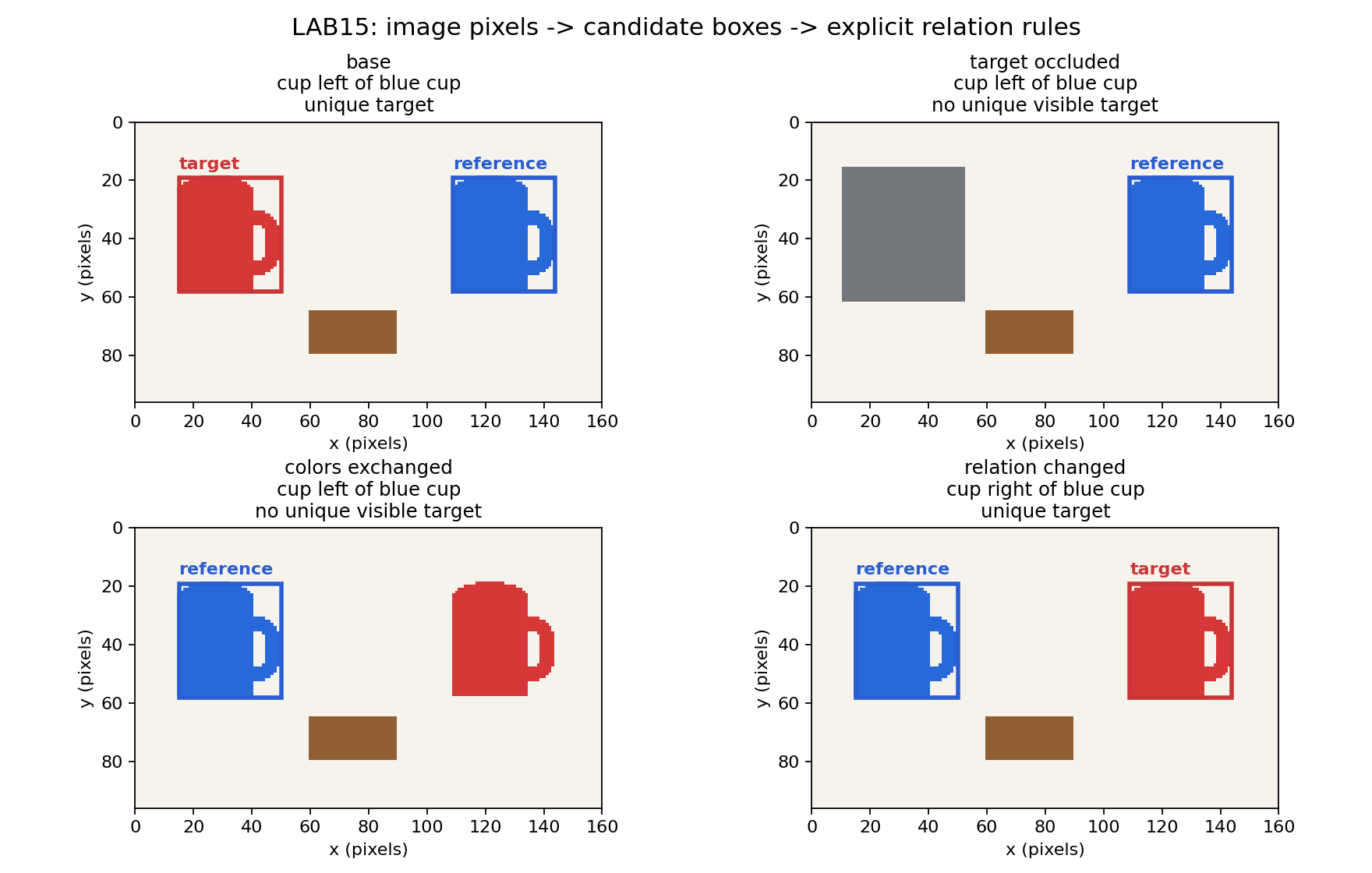
红色框线标目标角色,蓝色框线标参照物角色,框线颜色与物体填充颜色不同。图和输出来自2026-09-22保存运行,当前整理没有重跑。若要研究学习式开放定位,最后一节保留官方模型入口,但该模型的结果不能由当前规则实验代替。
1. 让错误暴露,而不是把错误当正确示范
先完整运行旧规则。red cup 和 blue cup 可凭颜色命中;cup left of blue cup 却因为字符串含 blue 返回 right-blue。这里不是概率不够高,而是程序根本没有关系变量。最后的断言保留这一错误输出,是复现失败的断言,不是验收正确性。
本册依赖 NumPy、Pillow、Matplotlib;每格包含所需定义,按顺序在全新进程运行,无需 PyTorch、网络或别册数据。
展开完整实现代码
# Detached readonly runs write only to an isolated ephemeral directory.
import os, tempfile
_LAB_WORKDIR = tempfile.mkdtemp(prefix="lecture03-lab15-")
os.chdir(_LAB_WORKDIR)
print("ephemeral workdir:", _LAB_WORKDIR)

from pathlib import Path
import json, hashlib, platform, sys
from datetime import datetime, timezone
import numpy as np
from PIL import Image, ImageDraw
import matplotlib
if 'get_ipython' not in globals(): matplotlib.use('Agg')
import matplotlib.pyplot as plt
from matplotlib.patches import Rectangle
OUT=Path('outputs/lab15');OUT.mkdir(parents=True,exist_ok=True)
PALETTE={'red':(214,55,55),'blue':(40,105,218),'brown':(146,95,53)}
boxes=['left-red','right-blue','book']
def keyword_match(phrase):
    if 'red' in phrase and 'left of' not in phrase:return boxes[0]
    if 'blue' in phrase:return boxes[1]
    return boxes[0]
phrases=['red cup','blue cup','cup left of blue cup']
for p in phrases:print('historical keyword baseline:',p,'->',keyword_match(p))
assert keyword_match(phrases[-1])=='right-blue' # This is the demonstrated ERROR.2. 同一个底图上做干预
画布为 160×96 RGB 像素;左红杯、右蓝杯和棕色书的形状固定。我们保存三个真正的 PNG:原图、覆盖左杯的灰色遮挡图、仅交换红蓝像素值的图。遮挡不是在结果字典里删除 target,而是改变图像;颜色交换也不重新随机画一张场景。
代码断言干预区域之外的像素完全相等。颜色交换使蓝杯的身份从右侧移到左侧;它不改变轮廓、尺寸或背景。再在交换后的同一张图上将 left-of 改为 right-of,才构成只修改语言关系的第四个条件。
展开完整实现代码
def scene():
    img=Image.new('RGB',(160,96),(245,243,236));d=ImageDraw.Draw(img)
    def cup(x,color):
        d.rounded_rectangle((x+18,31,x+34,52),radius=7,outline=color,width=5)
        d.rectangle((x,24,x+25,57),fill=color)
        d.ellipse((x,19,x+25,29),fill=color)
    cup(15,PALETTE['red']);cup(109,PALETTE['blue'])
    d.rectangle((60,65,89,79),fill=PALETTE['brown'])
    return np.array(img)
base=scene();occluded=base.copy();occlusion_mask=np.zeros(base.shape[:2],bool);occlusion_mask[16:62,11:53]=True
occluded[occlusion_mask]=(115,118,123)
swapped=base.copy();redmask=np.all(base==PALETTE['red'],axis=-1);bluemask=np.all(base==PALETTE['blue'],axis=-1)
swapped[redmask]=PALETTE['blue'];swapped[bluemask]=PALETTE['red']
assert np.array_equal(base[~occlusion_mask],occluded[~occlusion_mask])
assert np.array_equal(base[~(redmask|bluemask)],swapped[~(redmask|bluemask)])
for label,arr in [('base',base),('target-occluded',occluded),('colors-exchanged',swapped)]:Image.fromarray(arr).save(OUT/('lab15-'+label+'.png'))3. 正确分解目标、参照物和关系
像素规则先按预定义 RGB 原型距离阈值产生颜色 mask,再计算四连通区域和半开坐标框 。原图左杯框为 [15,19,50,58],中心 x=32.5;蓝色参照杯框为 [109,19,144,58],中心 x=126.5。left-of 在此具体定义为中心横坐标严格小于,不暗示“整个框都在左侧”等其他关系语义。
解析 cup left of blue cup 得到 target category=cup、reference color=blue、relation=left。先找唯一蓝杯,再从其他 cup 候选中筛选满足关系者;书虽也位于蓝杯左边,但类别不是 cup。若参照物缺失或存在多个匹配,或者没有唯一可见目标,程序明确返回 None,不把蓝杯顶上去。
这里的视觉候选器也是规则:棕色被指定为 book,红/蓝被指定为 cup。它适合受控场景,不会识别任意颜色的真实杯子;可以观察到像素依赖,但不能把它写成“学会了视觉概念”。
展开完整实现代码
def connected_components(mask):
    seen=np.zeros(mask.shape,bool);components=[]
    for y,x in zip(*np.where(mask)):
        if seen[y,x]:continue
        stack=[(int(y),int(x))];seen[y,x]=True;points=[]
        while stack:
            yy,xx=stack.pop();points.append((yy,xx))
            for dy,dx in [(1,0),(-1,0),(0,1),(0,-1)]:
                ny,nx=yy+dy,xx+dx
                if 0<=ny<mask.shape[0] and 0<=nx<mask.shape[1] and mask[ny,nx] and not seen[ny,nx]:
                    seen[ny,nx]=True;stack.append((ny,nx))
        if len(points)>=30:
            yy,xx=np.array(points).T
            components.append([int(xx.min()),int(yy.min()),int(xx.max()+1),int(yy.max()+1)])
    return components

def pixel_candidates(rgb):
    candidates=[]
    for color,value in PALETTE.items():
        distance=np.linalg.norm(rgb.astype(float)-np.array(value),axis=-1)
        for box in connected_components(distance<20):
            candidates.append({'color':color,'category':'book' if color=='brown' else 'cup','box':box,'center_x':(box[0]+box[2])/2})
    return candidates

def ground(rgb,phrase):
    objects=pixel_candidates(rgb)
    if ' left of ' in phrase or ' right of ' in phrase:
        relation='left' if ' left of ' in phrase else 'right'
        target_noun,reference_phrase=phrase.split(' '+relation+' of ')
        ref_color=reference_phrase.split()[0]
        refs=[o for o in objects if o['category']=='cup' and o['color']==ref_color]
        if len(refs)!=1:return {'status':'reference missing/ambiguous','target':None,'reference':None,'candidates':objects}
        ref=refs[0]
        possible=[o for o in objects if o['category']==target_noun and o is not ref and ((o['center_x']<ref['center_x']) if relation=='left' else (o['center_x']>ref['center_x']))]
        return {'status':'unique target' if len(possible)==1 else 'no unique visible target','target':possible[0] if len(possible)==1 else None,'reference':ref,'relation':relation,'candidates':objects}
    color,noun=phrase.split();found=[o for o in objects if o['color']==color and o['category']==noun]
    return {'status':'unique target' if len(found)==1 else 'no unique visible target','target':found[0] if len(found)==1 else None,'reference':None,'candidates':objects}

cases=[('base',base,'cup left of blue cup'),('target occluded',occluded,'cup left of blue cup'),('colors exchanged',swapped,'cup left of blue cup'),('relation changed',swapped,'cup right of blue cup')]
results=[]
for condition,pixels,phrase in cases:
    row={'condition':condition,'phrase':phrase,**ground(pixels,phrase)};results.append(row)
    print(condition,phrase,'->',row['status'],'target',row['target'],'reference',row['reference'])
assert results[0]['target']['color']=='red'
assert results[0]['reference']['color']=='blue'
assert results[0]['target']['box']==[15,19,50,58]
assert results[1]['target'] is None
assert results[2]['target'] is None
assert results[3]['target']['color']=='red' and results[3]['target']['box'][0]==1094. 根据实际输出解释每次条件变化
| 条件 | 参照物中心 x | 目标输出 | 原因 |
|---|---|---|---|
| 原图,left-of blue cup | 126.5 | 左红杯 [15,19,50,58] |
cup 且 32.5 < 126.5 |
| 同短语,遮住左杯 | 126.5 | 无唯一可见目标 | 目标像素不再可见 |
| 交换红蓝颜色,仍问 left-of | 32.5 | 无唯一可见目标 | 蓝参照物已在最左 |
| 同交换图,改问 right-of | 32.5 | 右红杯 [109,19,144,58] |
cup 且 126.5 > 32.5 |
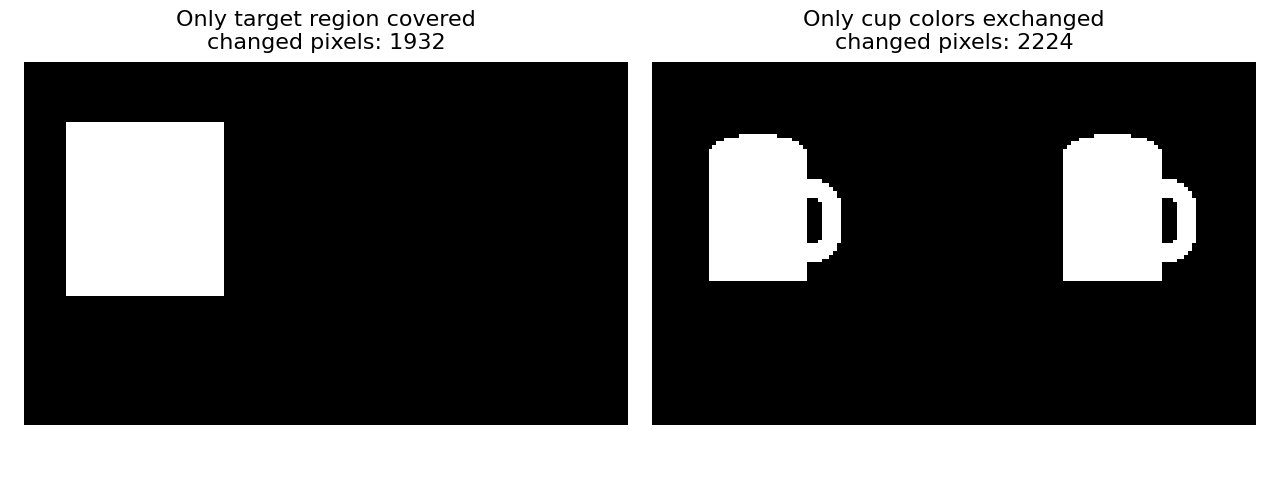
遮挡图只能证明本规则没有看见目标,不证明物理世界中杯子已不存在,更不是遮挡后的完整形状恢复。若希望系统根据上下文推断被遮物,需要另行定义任务、数据与评价。本册不把“不知道”替换为看似确定的框。
可改条件:把书也改成蓝色,会暴露“颜色等于类别”的规则假设;把两个蓝杯都画出来,会触发参照物歧义。先预测每一处应该返回框还是拒答,再修改图像观察。
展开完整实现代码
fig,axes=plt.subplots(2,2,figsize=(11,7))
for ax,(condition,pixels,phrase),row in zip(axes.flat,cases,results):
    ax.imshow(pixels)
    for role,color in [('target','#c93636'),('reference','#2a5ed0')]:
        obj=row.get(role)
        if obj:
            x1,y1,x2,y2=obj['box'];ax.add_patch(Rectangle((x1,y1),x2-x1,y2-y1,fill=False,ec=color,lw=2.5));ax.text(x1,y1-3,role,color=color,fontsize=10,weight='bold')
    ax.set(xlim=(0,160),ylim=(96,0),xlabel='x (pixels)',ylabel='y (pixels)')
    ax.set_title(condition+'\n'+phrase+'\n'+row['status'],fontsize=11)
fig.suptitle('LAB15: image pixels -> candidate boxes -> explicit relation rules',fontsize=14)
fig.tight_layout();fig.savefig(OUT/'lab15-grounding-interventions.png',dpi=160);plt.show();plt.close(fig)
fig,axes=plt.subplots(1,2,figsize=(8,3))
for ax,edited,title in [(axes[0],occluded,'Only target region covered'),(axes[1],swapped,'Only cup colors exchanged')]:
    changed=np.any(base!=edited,axis=-1);ax.imshow(changed,cmap='gray',vmin=0,vmax=1);ax.set_title(title+'\nchanged pixels: '+str(int(changed.sum())),fontsize=10);ax.axis('off')
fig.tight_layout();fig.savefig(OUT/'lab15-pixel-differences.png',dpi=160);plt.show();plt.close(fig)
report={'notebook_id':'7dc83786d067465aa76264475db2c62d','execution':'local fresh Python process; deterministic rules; no neural pretrained inference','created_utc':datetime.now(timezone.utc).isoformat(),'environment':{'python':sys.version,'numpy':np.__version__,'platform':platform.platform()},'coordinate_convention':'xyxy half-open pixels; relation compares horizontal box centers; category cup only','baseline_error':{'phrase':phrases[-1],'keyword_output':'right-blue','correct_target':'left red cup','failure':'blue modifies the reference, not the target'},'results':results,'pixel_changes':{'occlusion':int(np.any(base!=occluded,axis=-1).sum()),'color_exchange':int(np.any(base!=swapped,axis=-1).sum())},'pretrained_grounding_status':'not run; official GroundingDINO implementation and evidence linked in notebook','input_sha256':{p.name:hashlib.sha256(p.read_bytes()).hexdigest() for p in sorted(OUT.glob('lab15-*.png')) if p.name in ['lab15-base.png','lab15-target-occluded.png','lab15-colors-exchanged.png']}}
(OUT/'lab15-results.json').write_text(json.dumps(report,indent=2));print('saved',OUT)5. 真实 grounding 模型的证据入口与本册边界
Grounding DINO 官方仓库 提供模型结构、预训练 checkpoint、图像+文本推理代码、阈值与可视化;论文作者原文 给出方法与评价。这是已核验的一手实现入口,本册没有运行该权重,不将官方示例写成本次成绩,也不假设它必然正确解析任意空间关系。
官方 Python 示例的核心路径是 load_model → load_image → predict → annotate。predict 接收真正图像和文本,默认输出候选框及词级匹配分数;box threshold 和 text threshold 会影响保留框与短语。若后续运行,应固定 GroundingDINO_SwinT_OGC.py、groundingdino_swint_ogc.pth、输入 PNG、文本、两个阈值和设备,保存原始 boxes/logits/phrases 及模型权重哈希,再在本册的同图干预上比较。原图、遮挡图与颜色交换图已经生成在 outputs/lab15/,无需另找输入。
本次已完成: 关键词失败复现、可见像素候选、关系角色与坐标、四个真实条件输出、干预区域不变量检查。本次未完成: 预训练 grounding 权重下载与推理、开放词汇或真实照片评测。lab15-results.json 保留这个状态,不把外部入口当成已运行模型。