LAB 04 · CLIP:候选、提示与关系检验
主线阅读与优先实验
真实CLIP输入/权重/分数、候选改动、四条件规则与独立关系推理
对应课堂(4 页)
可先阅读已有结果,再决定是否运行。重算时请核对各节记录的数据、参数、环境与日期。
学习路径: 文字候选与图文检索
这里的zero-shot是不使用当前下游数据集再训练模型,直接用已有图像和文字编码器比较候选;并不保证相关概念从未进入预训练资料。读结果时同时记录cosine、候选softmax与top-1,解释为什么新增候选可改变softmax却不改变原有cosine。
最短路线:四臂设计 → 已保存真实结果 → 第5节关系反例。开头持球规则是可跳过的解析热身。想重算时按原代码顺序准备;默认RUN_CLIP=False、RUN_FRESH_CLIP=False,只准备或读缓存,不能称为本次模型推理。模型、照片和2026-09-22复核的来源在各结果旁保留。
完成后留下一个具体对照:固定了什么、改变了什么、哪个分数因此改变。需要把向量做成图库时再进入LAB 12,不重复做一份猫图实验。
先做一个无需模型的关系检验
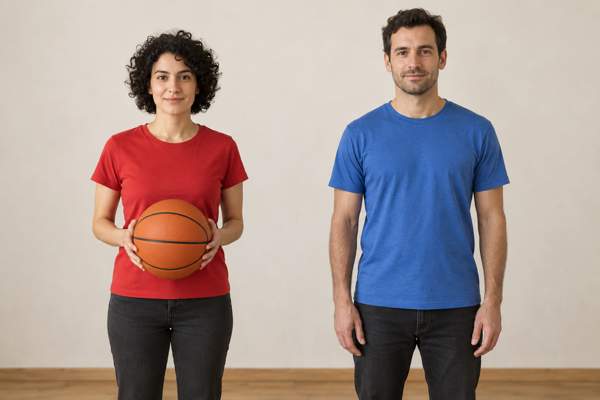
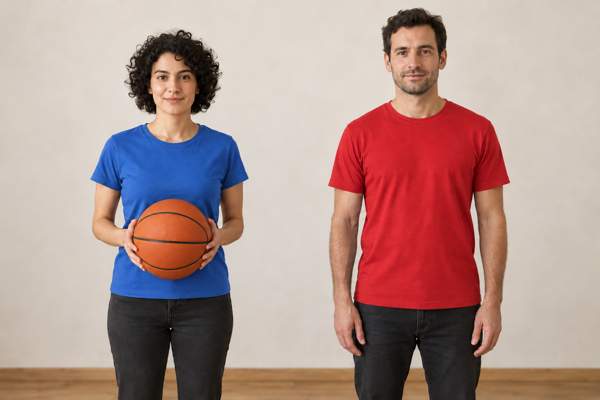
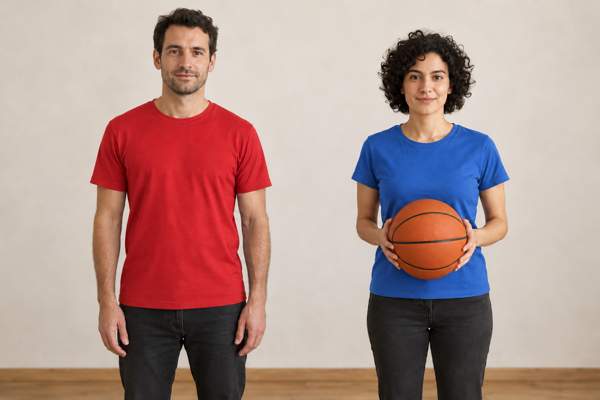
观察同一套 A/B 候选,再预测两条规则。 左右均按观看者位置。
A. A person in red holds a ball beside a person in blue.
B. A person in blue holds a ball beside a person in red.
| 条件 1:左红持球、右蓝 | 条件 2:左蓝持球、右红 |
|---|---|
 |
 |
| 条件 3:左红、右蓝持球 | 条件 4:左蓝、右红持球 |
|---|---|
 |
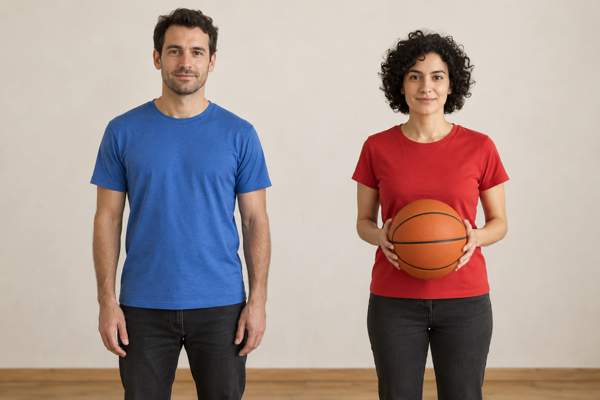 |
ImageGen 情境插图。对象、衣色、左右与持球身份按条件核对;独立生成图中的姿态、背景与光照也可能变化,因此不是严格单变量照片实验。
在前两种条件里,“看持球者衣色”和“只看左侧衣色”给出相同答案。先不运行代码,分别填入条件 3/4 下两条规则会选 A 还是 B。哪一个改动使两条解释产生不同预测?
共享素材:本讲新版持球四条件,按观看者左右排列;每图两人一个球,非持球人不接触球。图像来自同一人物场景的编辑与条件重组,用于区分两条规则,不是模型推理结果。
展开完整实现代码
# 每次整册运行使用临时工作目录,保留项目旧文件与历史结果。
import os, tempfile
L03_RUN_DIR=tempfile.mkdtemp(prefix="lecture03-lab04-")
os.chdir(L03_RUN_DIR)
# 可独立运行;无需前面任何模型、文件或隐藏变量。
# 改 holder 为 left/right,先预测,再看两条规则是否仍然一致。
conditions = [
    {'condition': 1, 'left': 'red', 'right': 'blue', 'holder': 'left'},
    {'condition': 2, 'left': 'blue', 'right': 'red', 'holder': 'left'},
    {'condition': 3, 'left': 'red', 'right': 'blue', 'holder': 'right'},
    {'condition': 4, 'left': 'blue', 'right': 'red', 'holder': 'right'},
]
def choice_for_color(color):
    return {'red': 'A', 'blue': 'B'}[color]
def compare_rules(case):
    relation = choice_for_color(case[case['holder']])
    position = choice_for_color(case['left'])
    return relation, position
assert compare_rules({'left':'red','right':'blue','holder':'right'}) == ('B','A')
print('条件 | 持球关系规则 | 左侧颜色规则 | 两者不同')
for case in conditions:
    relation, position = compare_rules(case)
    print(case['condition'], relation, position, relation != position)
确定性规则结果(也可直接阅读):
| 条件 | 按持球关系 | 按左侧衣色 | 能否区分两条规则 |
|---|---|---|---|
| 1 | A | A | 不能 |
| 2 | B | B | 不能 |
| 3 | B | A | 能 |
| 4 | A | B | 能 |
这些值来自条件定义和规则计算,不是 CLIP 相似度。若要检验真实模型,需要固定 A/B 文句,对全部四张图实际推理,再比较结果是否追踪持球关系。即使通过这四例,也仍需更多对象、布局与表达方式。
接下来保留的猫图实验回答另一个问题:候选与提示变化怎样改变真实 CLIP 的相对分数。图文匹配提供整图候选分数;需要区域坐标时看 CLS 03 的 GLIP,需要自由回答时看 LLaVA 的接口与训练。
1 · 图像不变,换文字候选改变了什么?
历史保存结果使用 OpenAI CLIP ViT-B/32 的真实预训练权重与固定真实照片 Chelsea the cat(Stefan van der Walt,CC0,来自 scikit-image v0.25.2)。模型与官方预处理固定,不做任何梯度更新。模型的大规模图文预训练没有在本册重做。
比较分为四臂,避免把候选集合与 prompt 同时改变:
| 臂 | 候选 | prompt | 隔离的问题 |
|---|---|---|---|
| A | cat / dog / horse | a photo of a {name}. |
固定的基线任务 |
| B | cat / dog / horse / tiger / fox | 与 A 相同 | 只扩展候选集合 |
| C | 与 A 相同 | a cropped photo of a {name}. |
只改变描述模板 |
| D | dog / horse / tiger / fox | 与 A 相同 | 删除原正确类别,改变可选答案空间 |
记录 cosine 相似度、模型 logit scale、softmax、top-1。当只扩展候选集时,共享候选的 cosine 应保持不变,而 softmax 会因分母改变。D 以 B 为直接对照:候选集只删除 cat、保留 B 的其余候选和 prompt。删除 cat 后,模型仍必须从剩余候选选一个;高相对分数不构成“开放世界里确定有它”的证明。
重算需安装 requirements.txt,运行 python fetch_clip.py 取得固定 revision 权重,再运行本节。下载失败时本节明确标为未运行;没有用随机相似度代替。模型文件约 600 MB,不放入教学小包。
**预处理复核(2026-09-18):**本包固定 transformers==4.57.1 与模型 revision。保存输出中的 use_fast 提醒说明当时使用 CLIPImageProcessor,不是执行失败。2026-09-18 的复核将同一慢图像处理器和 CLIPTokenizerFast 分开显式指定:RGB → 短边缩放 224(bicubic)→ 224×224 中心裁剪 → 按官方均值/标准差归一化。用包内同一照片及四臂全部 prompt,仅重跑预处理,所得像素张量和 token IDs 与原默认选择完全相同(最大像素张量差 0)。原相似度、图和输出仍是此前模型推理保存结果;该次预处理复核没有重跑模型。详细复核见包内 results/preprocessing-audit-20260918.json。
已保存的真实结果:v16 教师 CPU 推理
下图和表是保留的 v16 教师 CPU 推理,当前整理没有重新运行模型,不依赖下一格的 RUN_CLIP 值。原权重与照片哈希写在配套 provenance 中。
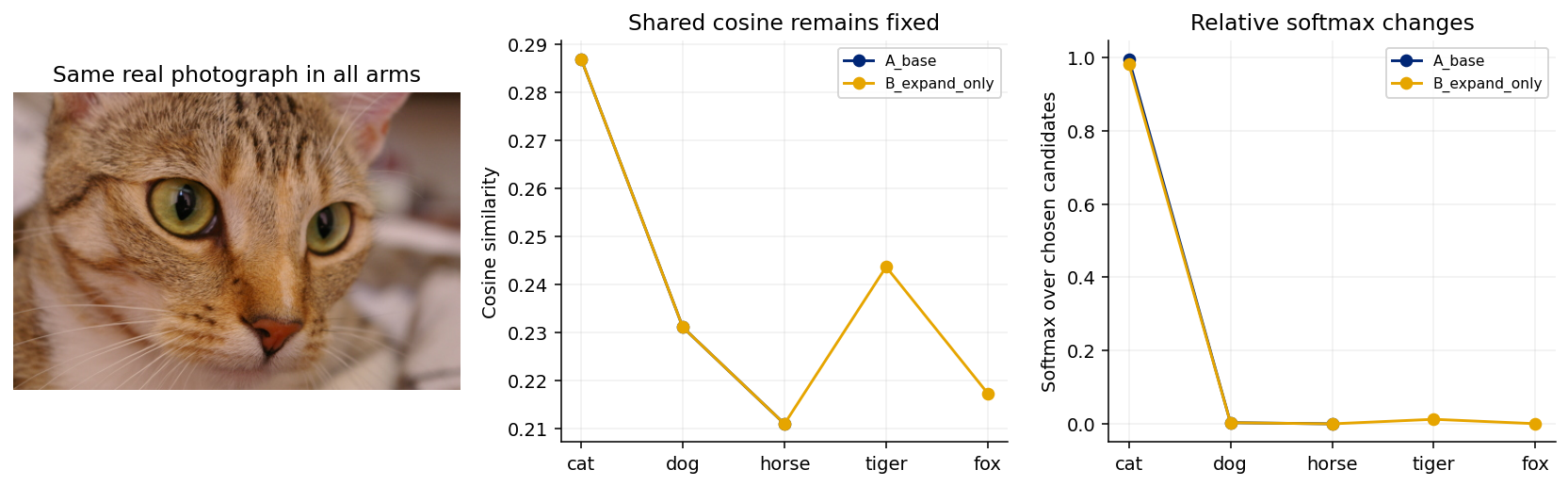
| 臂 | top-1 | 候选:cosine / softmax |
|---|---|---|
| A_base | cat | cat: 0.2869/0.9958;dog: 0.2310/0.0037;horse: 0.2109/0.0005 |
| Bexpandonly | cat | cat: 0.2869/0.9819;dog: 0.2310/0.0037;horse: 0.2109/0.0005;tiger: 0.2436/0.0130;fox: 0.2173/0.0009 |
| Cpromptonly | cat | cat: 0.2933/0.9951;dog: 0.2368/0.0035;horse: 0.2276/0.0014 |
| Dremovecat | tiger | dog: 0.2310/0.2039;horse: 0.2109/0.0273;tiger: 0.2436/0.7174;fox: 0.2173/0.0514 |
扩展候选后共享 cosine 保持不变,softmax 分母改变。D 删除 cat 后仍必须选一个;不能把剩余候选中的相对自信当作开放世界正确性。
2 · 独立准备并核对预处理
在当前项目准备 lab10-clip/ 并安装其中的 requirements.txt。小配置文件随包附带,代码将逐个校验。默认只进行图像/文字预处理;需要重做模型推理时,再从本目录运行 python fetch_clip.py 下载固定 revision 的公开权重(约 600 MB)。本轮不要求下载或运行模型。
展开完整实现代码
# 当前项目中的独立材料:已存在则复用,缺失才从本讲原站准备。
from pathlib import Path
import io, zipfile, requests
_base = Path.cwd()
_folder = 'lab10-clip'
_sentinel = 'assets/chelsea-cat.png'
_choices = [_base/_folder, _base/'lecture03-labs'/_folder, _base]
_ready = next((p for p in _choices if (p/_sentinel).is_file()), None)
if _ready is None:
    _url = 'https://codingai-lec03.pages.dev/course/materials/' + _folder + '.zip'
    _response = requests.get(_url, timeout=60)
    _response.raise_for_status()
    _payload = _response.content
    with zipfile.ZipFile(io.BytesIO(_payload)) as _archive:
        _names = [i.filename for i in _archive.infolist() if not i.is_dir()]
        _prefix = _folder + '/'
        _prefixed = all(n.startswith(_prefix) for n in _names)
        _destination = _base if _prefixed else _base/_folder
        for _item in _archive.infolist():
            _target = (_destination/_item.filename).resolve()
            if not _target.is_relative_to(_destination.resolve()):
                raise ValueError('材料包中有越界路径,停止解压。')
            if _item.is_dir():
                _target.mkdir(parents=True, exist_ok=True)
            elif not _target.exists():
                _target.parent.mkdir(parents=True, exist_ok=True)
                _target.write_bytes(_archive.read(_item))
    _ready = next((p for p in _choices if (p/_sentinel).is_file()), None)
assert _ready is not None, '请将本讲完整材料包解压到当前项目的 ' + _folder + '/;保留文件结构。'
LAB_ROOT = _ready
print('材料目录已就绪:', LAB_ROOT)

import json, hashlib, platform, sys
from pathlib import Path
import numpy as np
import matplotlib.pyplot as plt
ROOT=LAB_ROOT
if not (ROOT/'assets').is_dir() and (ROOT/'lab10-clip'/'assets').is_dir():ROOT=ROOT/'lab10-clip'
assert (ROOT/'assets').is_dir(), '请解压本实验完整包,并在该目录或其父目录运行。'
OUT=ROOT/'runs/current'; OUT.mkdir(parents=True,exist_ok=True)
FIG=OUT/'figures'; FIG.mkdir(exist_ok=True)
plt.rcParams.update({'figure.dpi':120,'font.size':10,'axes.spines.top':False,'axes.spines.right':False})
BLUE,GOLD,GREEN,PURPLE='#002676','#E6A500','#00856A','#69458D'
def sha_file(path):return hashlib.sha256(Path(path).read_bytes()).hexdigest()
def savefig(name):
    if not plt.gcf().get_constrained_layout():plt.tight_layout()
    plt.savefig(FIG/name,dpi=140,bbox_inches='tight');plt.show()

import torch
from PIL import Image
# 若宿主缺少固定预处理依赖,仅装入本次临时目录;不修改项目环境或下载模型权重。
import importlib.util, importlib.metadata, subprocess
try:
    _transformers_version=importlib.metadata.version('transformers')
except importlib.metadata.PackageNotFoundError:
    _transformers_version=None
if _transformers_version!='4.57.1':
    _deps=ROOT/'_temporary_preprocessing_dependencies'
    subprocess.check_call([sys.executable,'-m','pip','install','--quiet','--disable-pip-version-check',
                           '--no-cache-dir','--target',str(_deps),'transformers==4.57.1',
                           'numpy=='+np.__version__,'filelock>=3.20.3,<4'])
    sys.path.insert(0,str(_deps))
    importlib.invalidate_caches()
from transformers import CLIPProcessor,CLIPImageProcessor,AutoTokenizer
import transformers
assert transformers.__version__=='4.57.1', '请使用包内固定 requirements.txt。'
torch.set_num_threads(2)
provenance=json.loads((ROOT/'assets/provenance.json').read_text())
assert sha_file(ROOT/'assets/chelsea-cat.png')==provenance['image_sha256']
REVISION=provenance['revision']
local=ROOT/'.model-cache'/REVISION
config_local=ROOT/'model-config'
# small verified config files ship in the package; weights are downloaded only on request.
manifest=json.loads((config_local/'manifest.json').read_text())
for f,expected in manifest['sha256'].items():assert sha_file(config_local/f)==expected
clip_processor=CLIPProcessor(image_processor=CLIPImageProcessor.from_pretrained(config_local,local_files_only=True),tokenizer=AutoTokenizer.from_pretrained(config_local,local_files_only=True,use_fast=True))
photo=Image.open(ROOT/'assets/chelsea-cat.png').convert('RGB')
arms={'A_base':(['cat','dog','horse'],'a photo of a {}.'),'B_expand_only':(['cat','dog','horse','tiger','fox'],'a photo of a {}.'),'C_prompt_only':(['cat','dog','horse'],'a cropped photo of a {}.'),'D_remove_cat':(['dog','horse','tiger','fox'],'a photo of a {}.')}
image_inputs=clip_processor(images=photo,return_tensors='pt')
all_prompts=list(dict.fromkeys(template.format(name) for names,template in arms.values() for name in names))
text_inputs=clip_processor(text=all_prompts,padding=True,return_tensors='pt')
assert tuple(image_inputs['pixel_values'].shape)==(1,3,224,224)
assert clip_processor.image_processor.__class__.__name__=='CLIPImageProcessor'
assert clip_processor.tokenizer.__class__.__name__=='CLIPTokenizerFast'
preprocess_verification={'scope':'preprocessing only, no weights loaded','pixel_shape':list(image_inputs['pixel_values'].shape),'pixel_sha256':hashlib.sha256(image_inputs['pixel_values'].numpy().tobytes()).hexdigest(),'prompt_count':len(all_prompts),'tokenizer':clip_processor.tokenizer.__class__.__name__,'image_processor':clip_processor.image_processor.__class__.__name__,'transformers':transformers.__version__,'image_sha256':sha_file(ROOT/'assets/chelsea-cat.png'),'revision':REVISION}
historical_preprocess=json.loads((ROOT/'historical-v16/results/preprocessing-audit-20260918.json').read_text())
assert preprocess_verification['pixel_sha256']==historical_preprocess['pixel_values_sha256']
legacy_processor=CLIPProcessor.from_pretrained(config_local,local_files_only=True)
legacy_image=legacy_processor(images=photo,return_tensors='pt')
legacy_text=legacy_processor(text=all_prompts,padding=True,return_tensors='pt')
assert torch.equal(legacy_image['pixel_values'],image_inputs['pixel_values'])
assert all(torch.equal(legacy_text[k],text_inputs[k]) for k in text_inputs)
preprocess_verification['legacy_default_pixel_max_abs_difference']=float((legacy_image['pixel_values']-image_inputs['pixel_values']).abs().max())
preprocess_verification['all_prompt_token_tensors_equal']=True
preprocess_verification['token_ids_sha256']=hashlib.sha256(text_inputs['input_ids'].numpy().tobytes()).hexdigest()
(OUT/'preprocessing-verification.json').write_text(json.dumps(preprocess_verification,indent=2));print(json.dumps(preprocess_verification,indent=2))
本地保存输出(非 Deepnote 云端运行)
Using a slow image processor as `use_fast` is unset and a slow processor was saved with this model. `use_fast=True` will be the default behavior in v4.52, even if the model was saved with a slow processor. This will result in minor differences in outputs. You'll still be able to use a slow processor with `use_fast=False`.
{
  "scope": "preprocessing only, no weights loaded",
  "pixel_shape": [
    1,
    3,
    224,
    224
  ],
  "pixel_sha256": "59ba65f37c29915984addd8e4d8856f9c1579c284af0ef0260bc4f25eadbbab9",
  "prompt_count": 8,
  "tokenizer": "CLIPTokenizerFast",
  "image_processor": "CLIPImageProcessor",
  "transformers": "4.57.1",
  "image_sha256": "596aa1e7cb875eb79f437e310381d26b338a81c2da23439704a73c4651e8c4bb",
  "revision": "3d74acf9a28c67741b2f4f2ea7635f0aaf6f0268",
  "legacy_default_pixel_max_abs_difference": 0.0,
  "all_prompt_token_tensors_equal": true,
  "token_ids_sha256": "b51f79cb2f07674c29ec6589bd5bc2f1537e340cfc6c78f567d3d09481d2a902"
}
3 · 可选:固定模型,重算四个候选条件
默认 RUN_CLIP=False,保留猫图历史分数供阅读。若自行重做推理:先准备固定权重,再改为 True,顺序运行。新输出只写 runs/current/。只完成预处理不表示已经完成模型推理。
展开完整实现代码
RUN_CLIP=False  # 已下载固定权重后改 True;默认只核对准备与预处理。
if RUN_CLIP:
    from transformers import CLIPModel, CLIPProcessor, CLIPImageProcessor, AutoTokenizer
    from PIL import Image
    REVISION='3d74acf9a28c67741b2f4f2ea7635f0aaf6f0268'
    local=ROOT/'.model-cache'/REVISION
    assert (local/'pytorch_model.bin').exists(), '先运行 python fetch_clip.py;本单元不伪造相似度。'
    assert sha_file(local/'pytorch_model.bin')==provenance['model_sha256'], '权重 SHA-256 不匹配,停止。'
    clip_model=CLIPModel.from_pretrained(local,local_files_only=True).eval()
    # Make the teacher run's slow image processing + fast tokenizer explicit.
    # A shared use_fast=False would also change the tokenizer; keep each choice separate.
    clip_processor=CLIPProcessor(
        image_processor=CLIPImageProcessor.from_pretrained(local,local_files_only=True),
        tokenizer=AutoTokenizer.from_pretrained(local,local_files_only=True,use_fast=True))
    for parameter in clip_model.parameters():parameter.requires_grad_(False)
    photo=Image.open(ROOT/'assets/chelsea-cat.png').convert('RGB')
    image_inputs=clip_processor(images=photo,return_tensors='pt')
    arms={
      'A_base':(['cat','dog','horse'],'a photo of a {}.'),
      'B_expand_only':(['cat','dog','horse','tiger','fox'],'a photo of a {}.'),
      'C_prompt_only':(['cat','dog','horse'],'a cropped photo of a {}.'),
      'D_remove_cat':(['dog','horse','tiger','fox'],'a photo of a {}.')}
    clip_records={}
    with torch.no_grad():
        image_feature=clip_model.get_image_features(**image_inputs)
        image_feature=image_feature/image_feature.norm(dim=-1,keepdim=True)
        scale=float(clip_model.logit_scale.exp())
        for arm,(names,template) in arms.items():
            prompts=[template.format(name) for name in names]
            text_inputs=clip_processor(text=prompts,return_tensors='pt',padding=True)
            text_features=clip_model.get_text_features(**text_inputs)
            text_features=text_features/text_features.norm(dim=-1,keepdim=True)
            cosine=(image_feature@text_features.T).squeeze(0)
            probabilities=(cosine*scale).softmax(-1)
            clip_records[arm]={'candidate_names':names,'prompts':prompts,'cosine':cosine.tolist(),
              'softmax':probabilities.tolist(),'top1':names[int(cosine.argmax())]}
    assert np.allclose(clip_records['A_base']['cosine'],clip_records['B_expand_only']['cosine'][:3],atol=2e-6)
    clip_result={'status':'actually run locally on CPU','model_repo':'openai/clip-vit-base-patch32','revision':REVISION,
      'model_sha256':sha_file(local/'pytorch_model.bin'),'image_sha256':sha_file(ROOT/'assets/chelsea-cat.png'),
      'image_source':'scikit-image v0.25.2 chelsea.png; Stefan van der Walt; CC0','logit_scale':scale,
      'arms':clip_records,'limitations':['one image; no dataset-level accuracy estimate','relative candidate scores are not open-set certainty']}
    (OUT/'clip-results.json').write_text(json.dumps(clip_result,indent=2))
    fig,axes=plt.subplots(1,3,figsize=(12,3.8));axes[0].imshow(photo);axes[0].axis('off');axes[0].set_title('Same real photograph in all arms')
    for arm,color in [('A_base',BLUE),('B_expand_only',GOLD)]:
        rr=clip_records[arm]; loc=np.arange(len(rr['candidate_names']))
        axes[1].plot(loc,rr['cosine'],marker='o',label=arm,color=color)
        axes[2].plot(loc,rr['softmax'],marker='o',label=arm,color=color)
    for ax,title in zip(axes[1:],['Shared cosine remains fixed','Relative softmax changes']):
        ax.set(xticks=range(5),xticklabels=arms['B_expand_only'][0],title=title);ax.legend(fontsize=8);ax.grid(alpha=.18)
    axes[1].set_ylabel('Cosine similarity');axes[2].set_ylabel('Softmax over chosen candidates')
    savefig('05-clip-candidates.png')
    print('Actual checkpoint SHA-256:',clip_result['model_sha256'])
    print('arm | top1 | candidate : cosine / softmax')
    for arm,r in clip_records.items():
        print(arm,r['top1'],[(name,round(co,4),round(pr,4)) for name,co,pr in zip(r['candidate_names'],r['cosine'],r['softmax'])])
else:
print('CLIP 未运行:请不要将空结果写成真实相似度。')本地保存输出(非 Deepnote 云端运行)
CLIP 未运行:请不要将空结果写成真实相似度。
4 · 只改一个条件
让 AI 只增加一个候选名;核对照片、模型 revision、预处理和旧 prompt 未改变,再比较共享候选 cosine 与新的 softmax。或只改同一候选集的描述模板。二者不要同时改变。
一张照片不提供数据集级准确率;预训练不是本实验复现对象,图文匹配也不是 captioning 或 text-to-image。
展开完整实现代码
# 当前单元无法确认宿主平台或是否使用全新进程;unknown 不等于 False。
verification={'identity':'v17 independent CLIP candidates','fresh_process':'unknown','preprocessing_actually_run':True,'clip_model_inference_actually_run':RUN_CLIP,'mnist_loaded':False,'cnn_loaded':False,'cloud_run':'unknown','historical_inference':'v16 saved CPU result; not this execution','revision':REVISION,'environment':{'python':platform.python_version(),'torch':torch.__version__,'transformers':transformers.__version__}}
(OUT/'verification.json').write_text(json.dumps(verification,indent=2));print(json.dumps(verification,indent=2))
本地保存输出(非 Deepnote 云端运行)
{
  "identity": "v17 independent CLIP candidates",
  "fresh_process": true,
  "preprocessing_actually_run": true,
  "clip_model_inference_actually_run": false,
  "mnist_loaded": false,
  "cnn_loaded": false,
  "cloud_run": false,
  "historical_inference": "v16 saved CPU result; not this execution",
  "revision": "3d74acf9a28c67741b2f4f2ea7635f0aaf6f0268",
  "environment": {
    "python": "3.12.14",
    "torch": "2.14.0+cpu",
    "transformers": "4.57.1"
  }
}
5 · 2026-09-22 保存实测:固定权重复核与关系分数
此前的猫图实验已经包含真实模型,值得复用。2026-09-22 的修复从原站源码 bbf8a78 的 course/materials/lab10-clip.zip 恢复照片、固定配置、旧结果和 provenance,未把旧分数换成新日期。随后在本地全新 Python 进程实际载入同一 CLIP ViT-B/32 checkpoint,完成图像编码、文字编码、归一化和相似度;没有重新训练 CLIP。
权重 revision 为 3d74acf9a28c67741b2f4f2ea7635f0aaf6f0268,权重 SHA-256 为 a63082132ba4f97a80bea76823f544493bffa8082296d62d71581a4feff1576f。真实猫图的预处理张量 SHA 与旧记录一致,四臂全部 cosine 与旧输出的最大绝对差为 1.0431×10⁻⁷。这项复核支持“使用相同输入和模型得到相同分数”,不把一个样本的成功扩大为模型总体准确率。
完整代码、输入、缓存和 2026-09-22 输出,下载解压后先安装 requirements-cache.txt。缓存阅读和检索无需下载 605 MB 权重。若要在自己的环境重算编码,安装 requirements-inference.txt,执行 python fetch_clip.py,再执行 python run_clip_retrieval.py --encode。固定权重哈希错误会停止,下载失败不会伪造分数。新运行进入新的 UTC 时间目录。
展开完整实现代码
# 独立材料,不依赖另一册 notebook 的内存;重复运行复用本项目已下载内容。
from pathlib import Path
import io, json, zipfile, requests, sys, hashlib
_candidates=[Path.cwd()/'lecture03-clip-retrieval', Path.cwd()]
RETRIEVAL_ROOT=next((p for p in _candidates if (p/'cache/clip-features.npz').exists()),None)
if RETRIEVAL_ROOT is None:
    _response=requests.get('https://codingai-lec03.pages.dev/course/materials/lecture03-clip-retrieval.zip',timeout=60)
    _response.raise_for_status()
    _data=_response.content
    print('下载材料 ZIP:',len(_data),'bytes; SHA256',hashlib.sha256(_data).hexdigest())
    with zipfile.ZipFile(io.BytesIO(_data)) as z:
        for info in z.infolist():
            target=(Path.cwd()/info.filename).resolve()
            assert target.is_relative_to(Path.cwd().resolve()), '拒绝越界路径'
            if info.is_dir():target.mkdir(parents=True,exist_ok=True)
            elif not target.exists():
                target.parent.mkdir(parents=True,exist_ok=True);target.write_bytes(z.read(info))
    RETRIEVAL_ROOT=Path.cwd()/'lecture03-clip-retrieval'
assert (RETRIEVAL_ROOT/'cache/provenance.json').is_file()
sys.path.insert(0,str(RETRIEVAL_ROOT))
import run_clip_retrieval as cr
import numpy as np
p=json.loads((RETRIEVAL_ROOT/'cache/provenance.json').read_text())
assert cr.sha(RETRIEVAL_ROOT/'cache/clip-features.npz')==p['cache_sha256']
assert cr.sha(RETRIEVAL_ROOT/'assets/manifest.json')==p['manifest_sha256']
manifest=json.loads((RETRIEVAL_ROOT/'assets/manifest.json').read_text())
for r in manifest['gallery']+manifest['relation']+manifest['holder']:
    assert cr.sha(RETRIEVAL_ROOT/r['path'])==r['sha256']
a=np.load(RETRIEVAL_ROOT/'cache/clip-features.npz')
print('已核验真实 CLIP 缓存;生成时间',p['generated_at_utc'])
print('本格只载入缓存,没有在当前 notebook 运行 CLIP 编码器。')
print('gallery, queries:',a['gallery'].shape,a['queries'].shape)
预处理和两条编码支路到底做了什么?
图像先转 RGB,以 bicubic 将短边缩放至 224,再中心裁剪为 224×224,使用 checkpoint 指定的均值和标准差归一化。文本用固定 CLIPTokenizerFast 产生 token IDs、起止标记和 padding;本例短句没有超过 77-token 上限。图像批次是 [B,3,224,224],文字批次是 [Q,L],两个编码器的输出均投影为 512 维。它们随后分别除以 L2 范数;这一步之后点积才等于 cosine。
设图像、文字特征为 ,归一化后的分数为 。候选内分布 还需要固定模型的 ,本 checkpoint 为约 100。A→B 改变分母,A→C 改变 token 和文本特征;B→D 删除了正确答案。三种干预不能混为“模型概率变了”。
候选 softmax 既没有估计候选之外的类别,也没有做概率校准。D 的 tiger 为 0.7174,只说明它在删去 cat 后的四个选项里分数最高;不能推出照片有 71.74% 的概率是一只老虎。图搜文是固定图片对多条文字排序,文搜图是固定文字对多张图片排序;两个方向使用同一相似度矩阵的不同维度,都不生成一个新句子。caption 需要逐词条件分布和解码器,详见 LAB 13。
展开完整实现代码
# 可读的核心路径。默认不再重算;缓存已经由完全相同路径生成。
# 将 RUN_FRESH_CLIP 改为 True 前,按说明准备依赖和固定权重。
RUN_FRESH_CLIP=False
if RUN_FRESH_CLIP:
    import subprocess
    subprocess.run([sys.executable,str(RETRIEVAL_ROOT/'fetch_clip.py')],check=True)
    subprocess.run([sys.executable,str(RETRIEVAL_ROOT/'run_clip_retrieval.py'),'--encode'],check=True)
else:
    saved=json.loads((RETRIEVAL_ROOT/'cache/clip-results.json').read_text())
    for arm,r in saved['arms'].items():
        print(arm,list(zip(r['candidate_names'],np.round(r['cosine'],4),np.round(r['softmax'],4))))
    print('保存结果的来源:',p['execution'],p['generated_at_utc'])
同一对象只交换左右,真实 CLIP 是否跟着关系改变?
2026-09-22 的关系实验先把同一猫照片和同一宇航员照片各裁成 224×224 方块,放入固定的 448×448 灰色画布。第二张只交换两个方块的横向位置,灰背景、像素内容、尺寸和两条文字都固定。它是明确的照片拼贴教学构造,来源分别是 Stefan van der Walt 的 CC0 猫图与 NASA 公共领域照片,不声称是自然拍摄场景。
候选 0:a cat on the left and an astronaut on the right.
候选 1:an astronaut on the left and a cat on the right.
| 实际输入 | 候选 0 cosine | 候选 1 cosine | 预测 | 判断 |
|---|---|---|---|---|
| 猫左/宇航员右 | 0.378499 | 0.381837 | 1 | 错 |
| 宇航员左/猫右 | 0.356597 | 0.363012 | 1 | 对 |
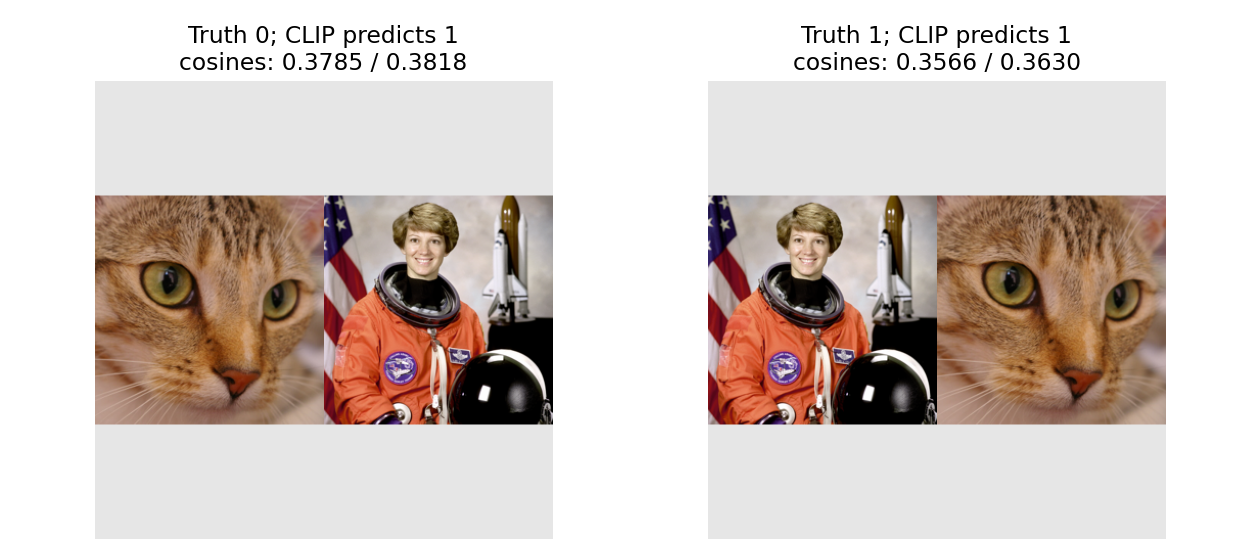
分数本身确实随图改变,但两次排序都偏好候选 1。模型能抓住对象共现,不保证正确绑定“谁在左边”。这不是只看生成的句子判断成败,而是用已知坐标定义真值,再检验排序。两例能构成一个明确反例,不能估计关系理解的总体水平。
原四幅持球图也在 2026-09-22 实际编码,分数如下;前文“关系规则”的表仍是规则输出,不能用这个新表倒改其身份。四幅旧插图存在背景和姿态差异,所以 3/4 的局部正确率不是严格单变量因果结论。
| 条件 | 红衣持球文句 A | 蓝衣持球文句 B | CLIP 选择 | 定义真值 |
|---|---|---|---|---|
| 1 | 0.292193 | 0.292328 | B | A |
| 2 | 0.292411 | 0.292754 | B | B |
| 3 | 0.316829 | 0.317146 | B | B |
| 4 | 0.308224 | 0.307590 | A | A |
这里所有差距都很小。只看一张正确图片或只看最高候选名会掩盖这一点;扩充数据前不要把这四个结果称为稳定的关系能力。
**与当前课堂四格的区别:**上表属于已保存的旧四幅输入。v18 的 P61–62 后来改用同源颜色编辑和确定性镜像,不能直接把此处旧分数当作当前四格的模型输出。当前网页四格用于两条规则的预测比较;模型证据请依据本节保存的图片与输入哈希。当前四格的具体变化。
展开完整实现代码
# 重做缓存后的关系排序;可改排序/显示,不能改真值去迎合模型。
cos=a['relation_images']@a['relation_text'].T
print('关系 cosine:',cos)
print('预测:',cos.argmax(1),'真值:',[0,1])
assert cos.argmax(1).tolist()==[1,1]  # 当前已核验缓存的实际反例
for r in manifest['relation']:
    from IPython.display import display
    from PIL import Image
    display(Image.open(RETRIEVAL_ROOT/r['path']))
下一步:同一批真实向量怎样变成检索系统?
LAB 12 · CLIP延伸:缓存与检索(近似索引选读) 使用本包的 24×512 图片缓存与 12×512 查询缓存。那一册把“模型有分数”继续拆成三个问题:相关样本是否排在前面,近似索引漏掉了哪些 exact 邻居,以及减少向量运算是否真的减少了这个小系统的实测延迟。
这里保存的 2026-09-22 运行地点是本地 Linux CPU,Python 3.12.14、Torch 2.14.0+cpu、Transformers 4.57.1;未将这次运行标成 Deepnote 云端执行。legacy-audit.json、cache/provenance.json 与 verified/execution.json 分别记录旧源核验、当时完成的真实编码与完整脚本身份。